

How to Optimize the PrestaShop Database with Super Speed
As a PrestaShop store operates, its database can gradually accumulate records that are no longer useful, such as connection logs, page-view statistics, expired discount data, abandoned carts, and guest records.
Super Speed provides a Database Optimization tool that lets you review supported cleanup categories, export the relevant records when needed, and remove unnecessary data without manually deleting rows through SQL.
Database cleanup can reduce database size and unnecessary stored data, but it should be used selectively. Not every large table should be deleted, and cleanup is different from fixing slow SQL queries or tuning the database server.
This guide explains what Super Speed can clean, what each category means, and how to perform the cleanup safely.
What can Super Speed clean from the PrestaShop database?
Open your PrestaShop Back Office and go to Speed Optimization → Database optimization.
Super Speed analyzes several specific types of database data and shows the available records for each cleanup category:
- Connection logs
- Page views
- Useless discount codes
- Abandoned carts
- Guest data
These are deliberately limited cleanup targets. Super Speed does not perform a general-purpose purge of arbitrary PrestaShop tables, products, customers, orders, or other business data.
Before cleaning anything, understand what each category contains and whether you still need that information.
Connection logs
PrestaShop can accumulate connection records as visitors access the store. Over time, stores with substantial traffic can build up a large amount of connection-history data.
If you no longer need these records for historical statistics or reporting, Super Speed can remove the supported connection-log data.
Cleaning this category reduces stored connection history. It does not affect customer accounts, products, or orders.
Page views
Page-view records are used to keep statistical information about visits to pages on your store.
If a store has been running for a long time, this statistical history can become substantial. Super Speed allows you to export and clean these supported page-view records when the historical statistics are no longer needed.
Do not clean them simply because the record count looks high. If you rely on this historical information for PrestaShop statistics or reporting, keep it or export it before proceeding.
Useless discount codes
Expired promotions can leave records that are no longer relevant to active discounts.
In this cleanup category, Super Speed targets expired cart rules and expired specific-price records. It is intended to remove expired pricing and discount data rather than active promotions that customers can still use.
Review your promotion requirements before cleaning if historical discount information is important to your workflow.
Abandoned carts
PrestaShop stores carts even when the visitor never completes an order. On an established store, these unfinished carts can accumulate over time.
Super Speed does not simply delete every cart without an order. Its Database Optimization tool targets abandoned carts that:
- have no associated order; and
- are more than 3 days old.
The three-day condition is important because recent carts may still belong to shoppers who intend to return and complete their purchase.
If another module, reporting workflow, or marketing process relies on historical abandoned-cart data, consider that dependency before cleaning it.
Guest data
PrestaShop can also retain records associated with visitors who are not registered customers.
Super Speed provides a cleanup option for supported guest records where no customer account is associated with the record. This can help remove guest data that is no longer needed instead of allowing it to accumulate indefinitely.
As with the other categories, decide whether your store still needs this historical information before removing it.
How to clean the database with Super Speed
Once you have reviewed the data and prepared any exports or backups you need, the actual cleanup is straightforward.
From the Super Speed configuration page, open Database optimization. The page shows the supported data categories together with their available records and cleanup actions.
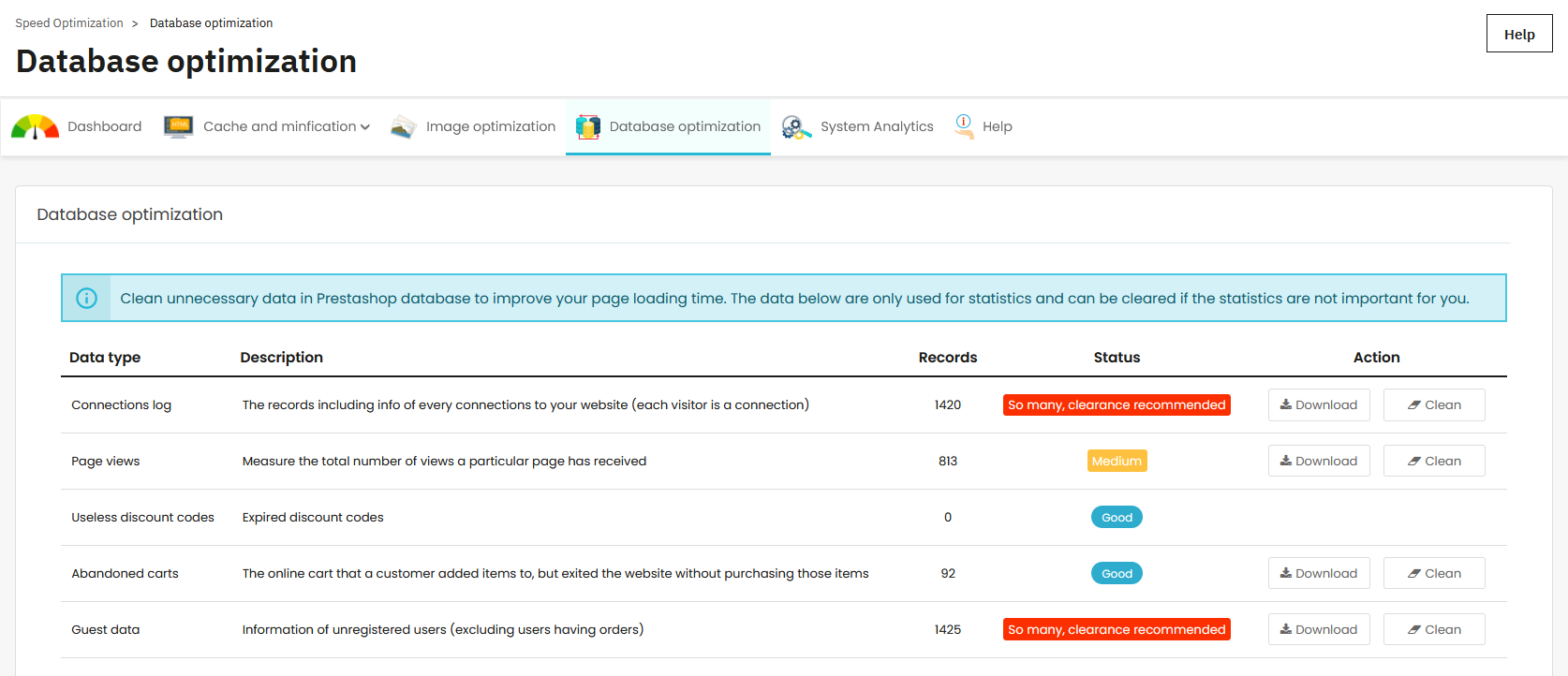
For each category you want to remove:
- Check what type of data the category contains.
- Review the number of records available for cleanup.
- Download the data first if you may need it later.
- Click Clean for that category.
- Confirm the cleanup when prompted.
- Review the remaining records after the operation completes.
This category-by-category approach is preferable when you want control over what is removed.
Super Speed also provides a Clean all action. Use it only when you have already reviewed all supported categories and are comfortable removing all data currently eligible for cleanup. Do not use Clean all merely because it is faster than checking the categories individually.
How often should you clean the database?
There is no single cleanup schedule that is right for every PrestaShop store.
A high-traffic store can accumulate connection and page-view records much faster than a small catalog. A store with frequent promotions may accumulate expired discount data differently from one that rarely uses cart rules. Some merchants also need historical statistics for much longer than others.
Instead of cleaning on an arbitrary schedule, check the Database Optimization page periodically and ask two questions:
Has a meaningful amount of removable data accumulated? If only a small number of records are available, frequent cleanup may provide little practical value.
Do I still need this data? Record age alone does not make information useless. Historical statistics may still matter for reporting, analysis, or another module.
Clean when unnecessary supported data has accumulated enough to justify maintenance, rather than treating database cleanup as something that must run constantly.
What should you expect after database cleanup?
The most direct result is a reduction in unnecessary stored records and, depending on the amount of data removed, database size.
This can be particularly useful when statistical and temporary tables have accumulated large amounts of historical data. Reducing unnecessary records can also reduce the amount of data some database operations need to work with.
However, do not expect every slow PrestaShop store to become fast simply because its database was cleaned.
Database size and database performance are related, but they are not the same thing. A large table can still perform efficiently with appropriate queries and indexes, while a smaller database can be slow because a module repeatedly runs an inefficient SQL query.
If your store is slow and you have not yet established whether database accumulation is actually part of the problem, start by diagnosing the broader performance bottleneck with Why Is My PrestaShop Store Slow? Causes & How to Diagnose.
What database optimization does not fix
The Database Optimization feature in Super Speed is a cleanup tool, not a complete MySQL optimization or database-administration system.
It can remove the specific unnecessary records supported by the module. It does not automatically fix:
- inefficient SQL queries;
- missing or poorly designed database indexes;
- slow queries generated by third-party modules;
- insufficient MySQL resources;
- incorrect MySQL server configuration;
- slow disk or hosting infrastructure;
- arbitrary oversized custom-module tables.
This distinction matters when troubleshooting performance.
If unnecessary statistical records have accumulated, cleaning them is an appropriate action. If a particular query is slow because of its design, deleting unrelated statistics will not solve that query. The query, its indexes, the responsible module, or the server configuration needs to be investigated instead.