Super Speed - Incredibly fast - WebP, Page Cache, Page Speed & SEO
★★★★★★★★★★5.0(359)
Speed up your store for smoother shopping, more sales and better SEO. Our PrestaShop speed optimization module boosts page speed, Google PageSpeed & GTmetrix scores with full page cache, Redis, Cloudflare, WebP image and database optimization.
Speed up your store for smoother shopping, more sales and better SEO. Our PrestaShop speed optimization module boosts page speed, Google PageSpeed & GTmetrix scores with full page cache, Redis, Cloudflare, WebP image and database optimization.
Why Does Your Store Need a PrestaShop Speed Optimization Module?
Is your PrestaShop store loading slowly on desktop or mobile?
Do you have low Google Page Speed (PageSpeed Insights) and GTmetrix scores, poor Core Web Vitals, or a slow LCP and TTFB?
Are large product images or an overloaded database slowing down your store?
Shoppers don't wait for slow pages: every extra second costs you sales and search visibility. Super Speed is an all-in-one PrestaShop speed optimization module that tackles all of these from one Back Office menu.
What You Get with Super Speed
Happier customers: pages open fast on desktop and mobile for a smoother shopping experience.
More sales: faster browsing and checkout keep shoppers buying instead of leaving.
Stronger PrestaShop SEO optimization: faster pages and better Core Web Vitals support your search rankings.
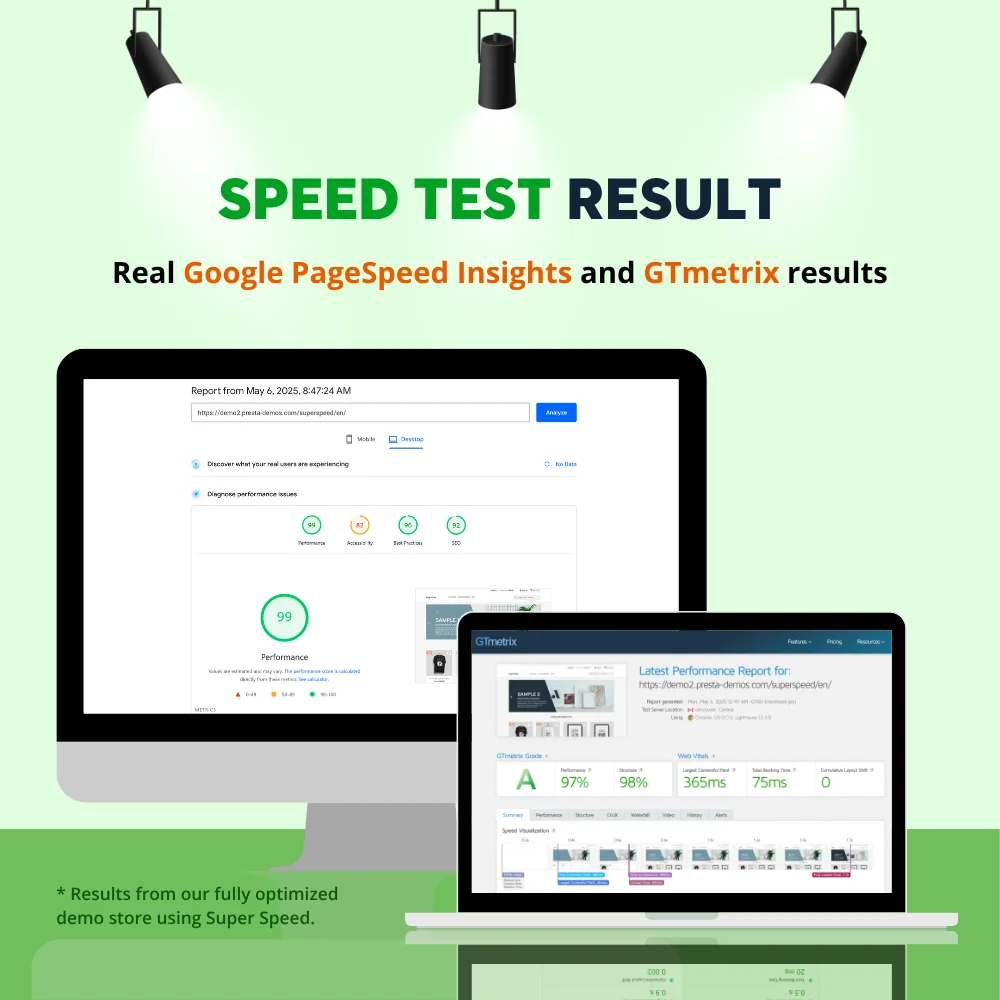
Better Google PageSpeed Insights and GTmetrix scores.
Lower server and database load thanks to caching and a cleaner database, even during traffic peaks.
Always up-to-date content: the cache refreshes itself when you edit products or content.
How Super Speed Delivers Complete PrestaShop Speed Optimization
Super Speed combines PrestaShop page cache (full page cache), PrestaShop image optimization, server and browser cache, code minification, Redis and Cloudflare caching, and database optimization in one module.
1. PrestaShop page cache
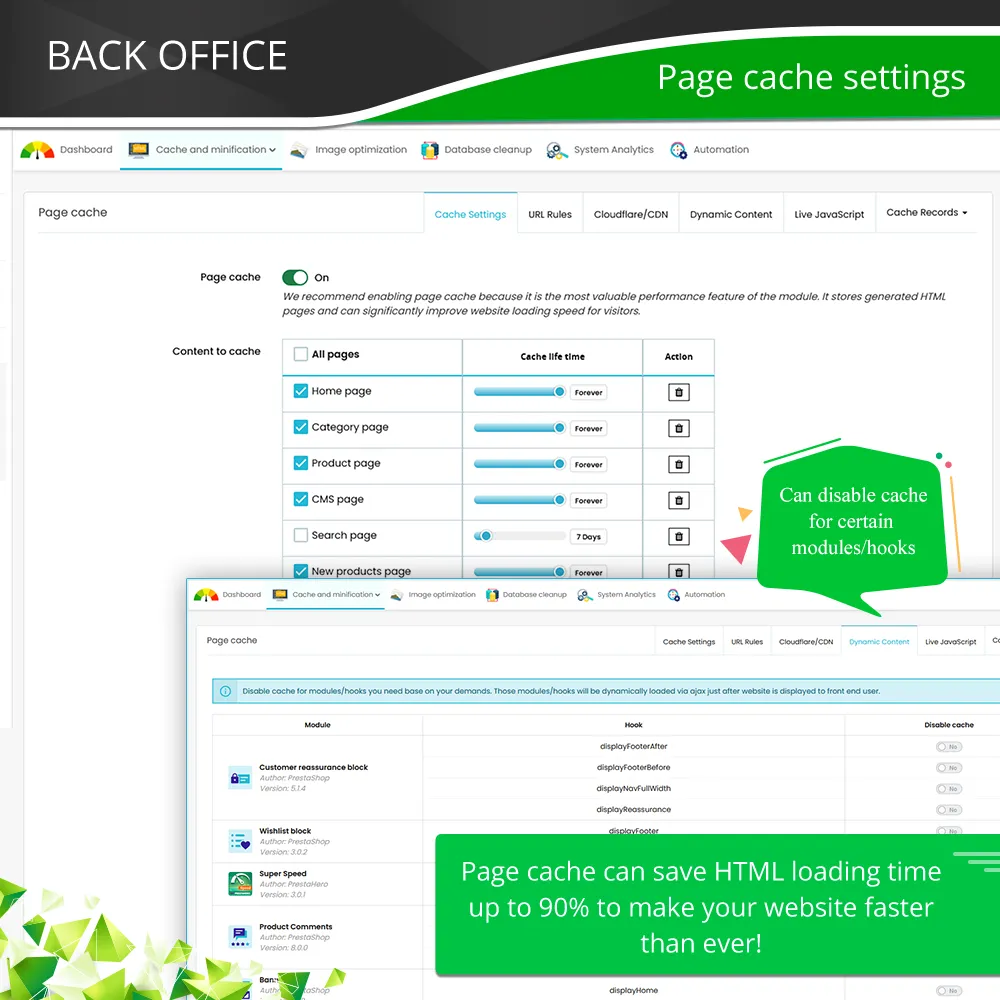
As a complete PrestaShop cache module, Super Speed delivers pages much faster, cutting server response time (TTFB), while keeping personal content correct:
Full page cache: stores ready-made HTML for home, category, product, CMS and search pages. Ad links with utm, gclid or fbclid reuse the same cache.
Cache by customer context: each cached page is saved separately by language and currency, and you can also split it by customer group, login status, cart status, country, state or device (desktop, tablet, mobile) when your prices or theme need it. Every shopper gets the version that matches them.
Dynamic content stays correct: cart, sign-in and currency blocks load separately for each visitor, and product prices can load dynamically for multi-currency or group pricing, so a cached page never shows the wrong cart or price. You can also mark any module or hook as dynamic so its content loads live and is never stored in the cache, or exclude specific URLs from page cache.
Smart cache refresh: when you edit a product, category or page, only the related cached pages are cleared.
2. PrestaShop image optimization
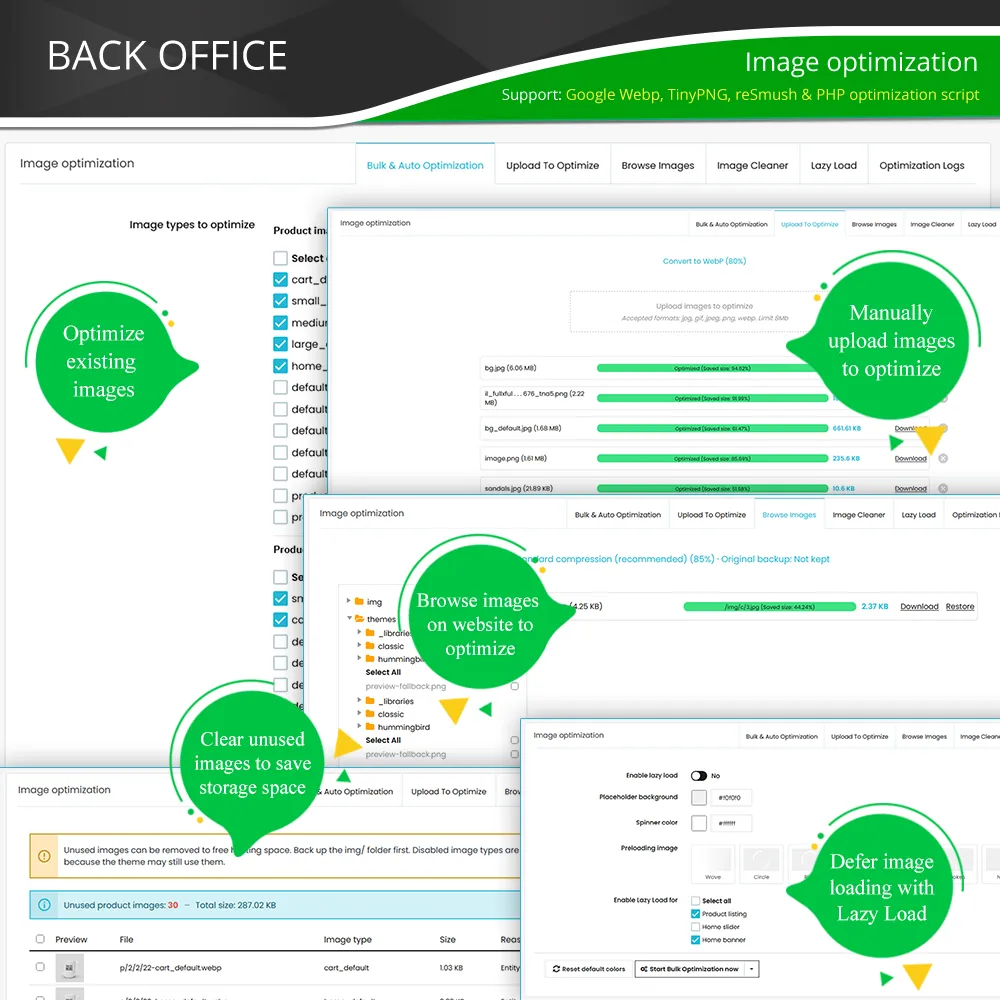
Super Speed's PrestaShop image optimization tool lets you compress PrestaShop images without visible quality loss, using free built-in compression, WebP conversion for all images, TinyPNG/TinyJPG or reSmush.it.
Optimize existing images in bulk and new uploads automatically, and use lazy loading to load images only when visitors scroll to them. Lighter pages mean a faster Largest Contentful Paint (LCP), better Core Web Vitals and stronger PrestaShop SEO optimization.
3. Server cache and browser cache
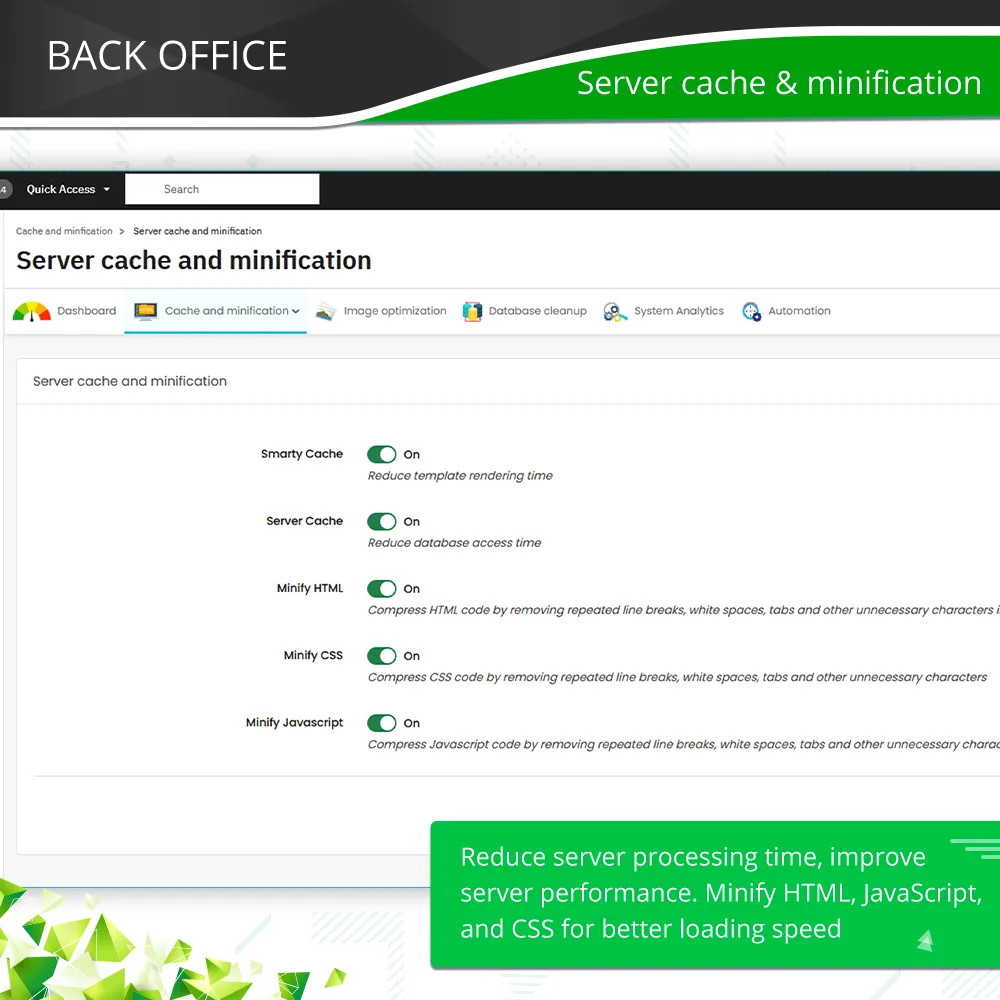
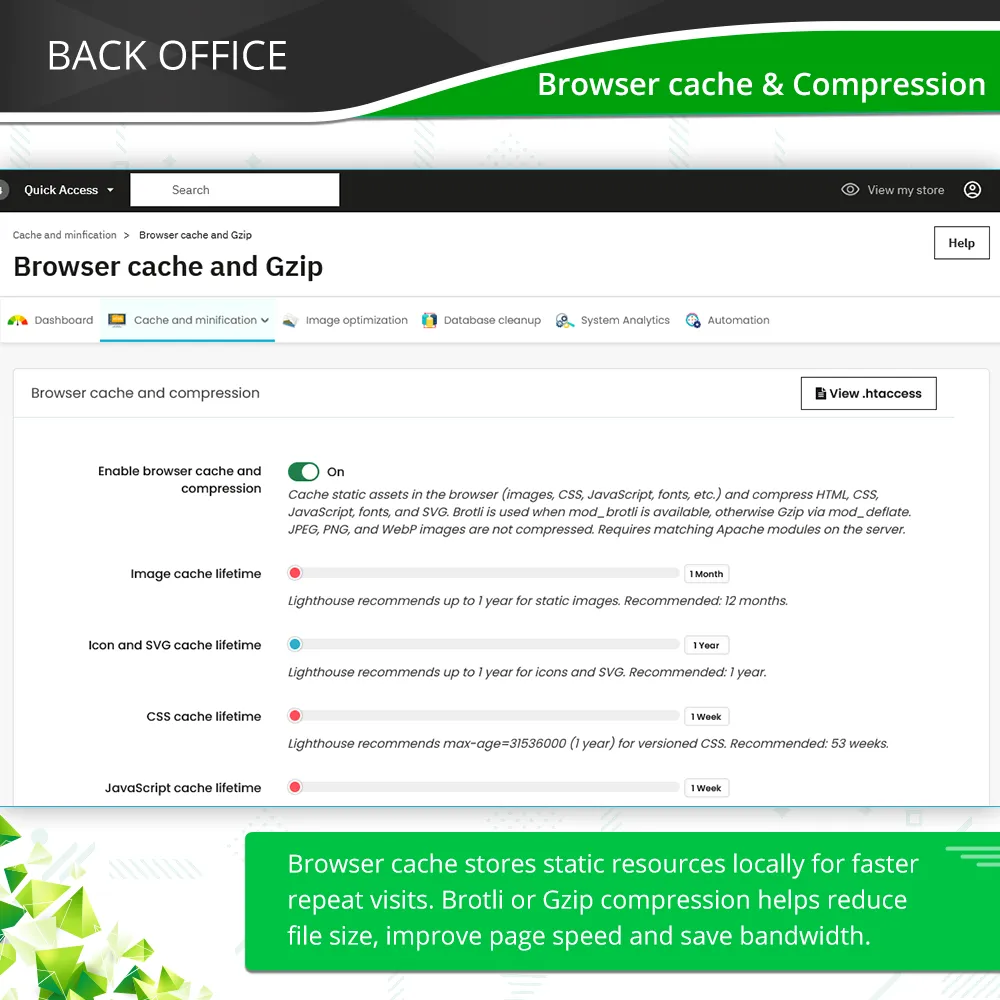
Smarty cache speeds up template rendering on the server. Browser cache stores images, CSS and JavaScript on visitors' devices for faster repeat visits.
4. Minification and Brotli/GZIP compression
HTML, CSS and JavaScript are minified automatically, then compressed with Brotli (or GZIP as a fallback). Smaller files load faster and save bandwidth.
5. Redis cache
Built-in Redis cache keeps repeated database query results in memory to reduce MySQL load (requires Redis on your hosting).
6. Cloudflare / CDN cache
Connect Cloudflare and Super Speed automatically purges updated pages from the Cloudflare cache.
For maximum speed, turn on full HTML page cache on Cloudflare: complete pages are stored on Cloudflare's edge servers and delivered from the location closest to each visitor, without waiting for your hosting server, for a much lower TTFB. Super Speed sends the right cache headers and shows the exact Cloudflare Cache Rules settings to use, and product prices can still load dynamically.
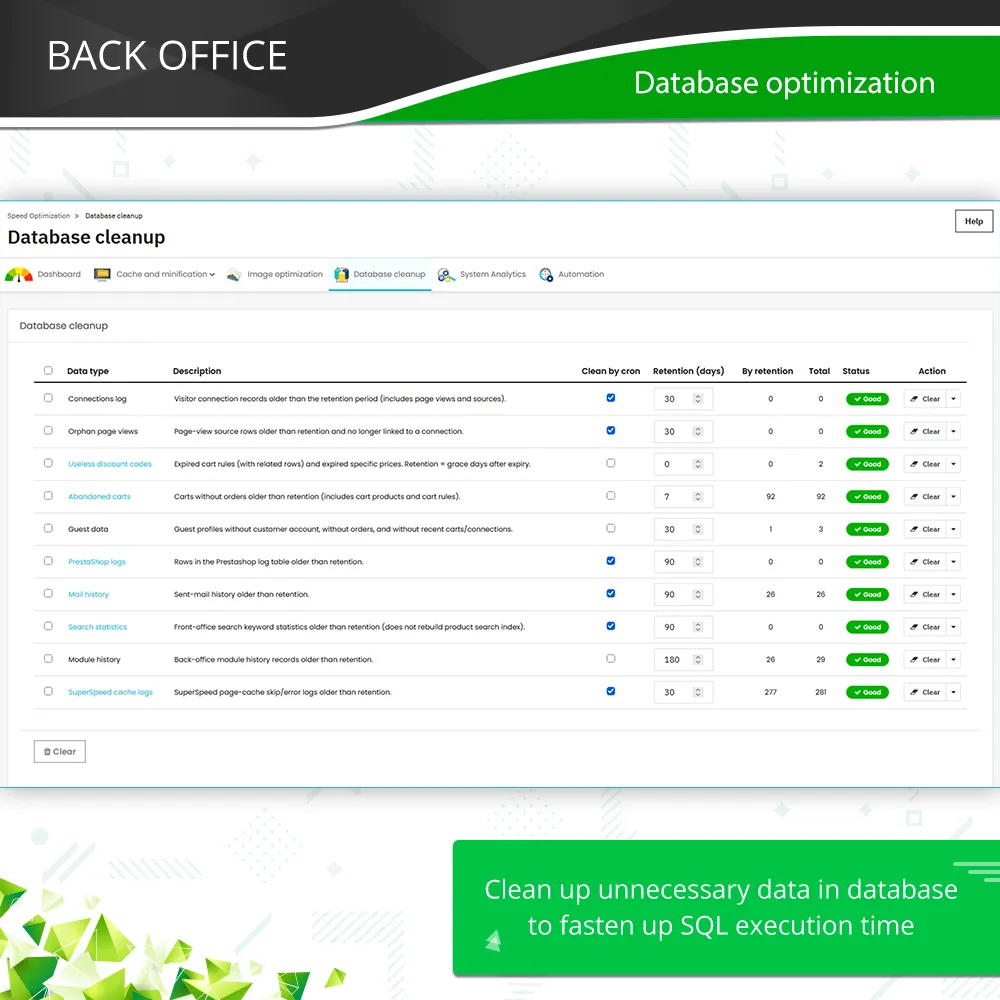
7. Database optimization and cleanup
Logs, page views, abandoned carts, expired discount codes and other old records pile up as your store grows.
With Super Speed, database optimization lets you choose how many days of data to keep for each type, export records before deleting, and run database cleanup manually or on a schedule, for faster queries and a lighter Back Office.
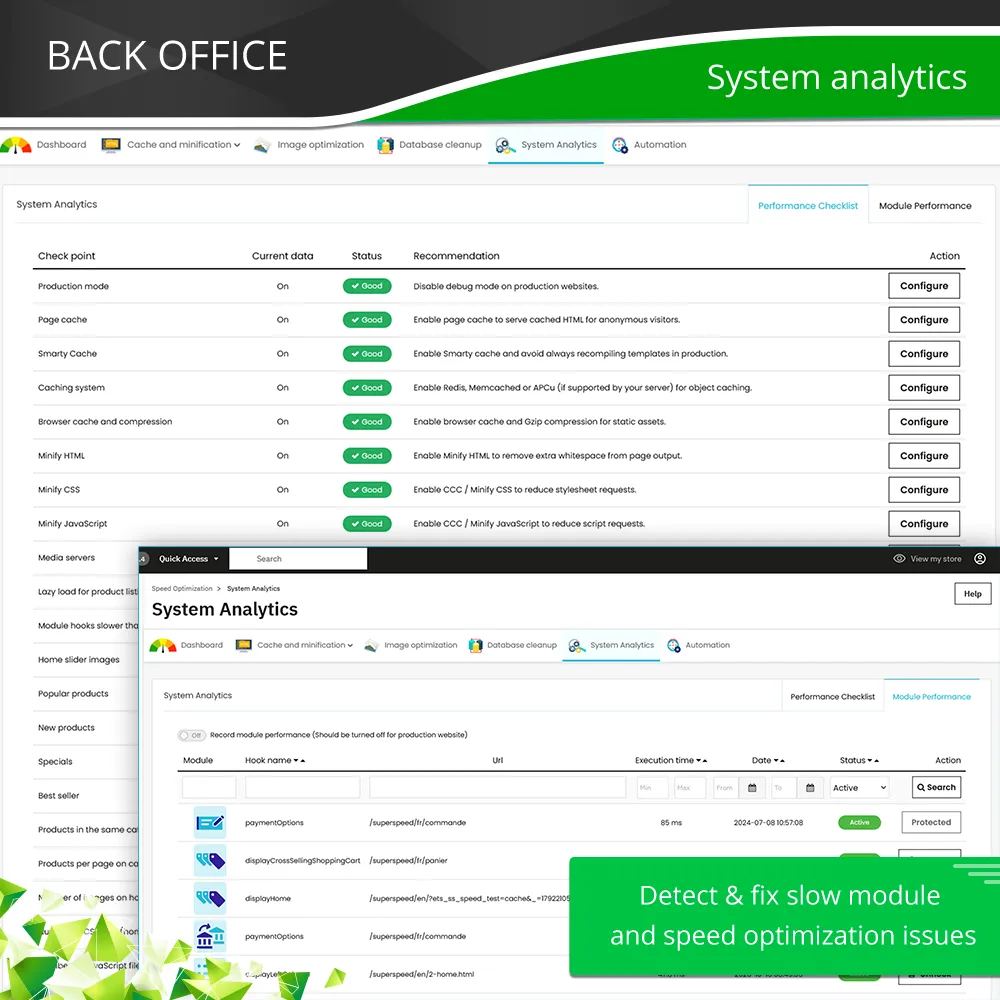
8. System Analytics
See how long each module takes on your pages and unhook the ones slowing your store down. Hooks needed for checkout, payment and customer accounts are protected.
9. One-click setup, dashboard and automation
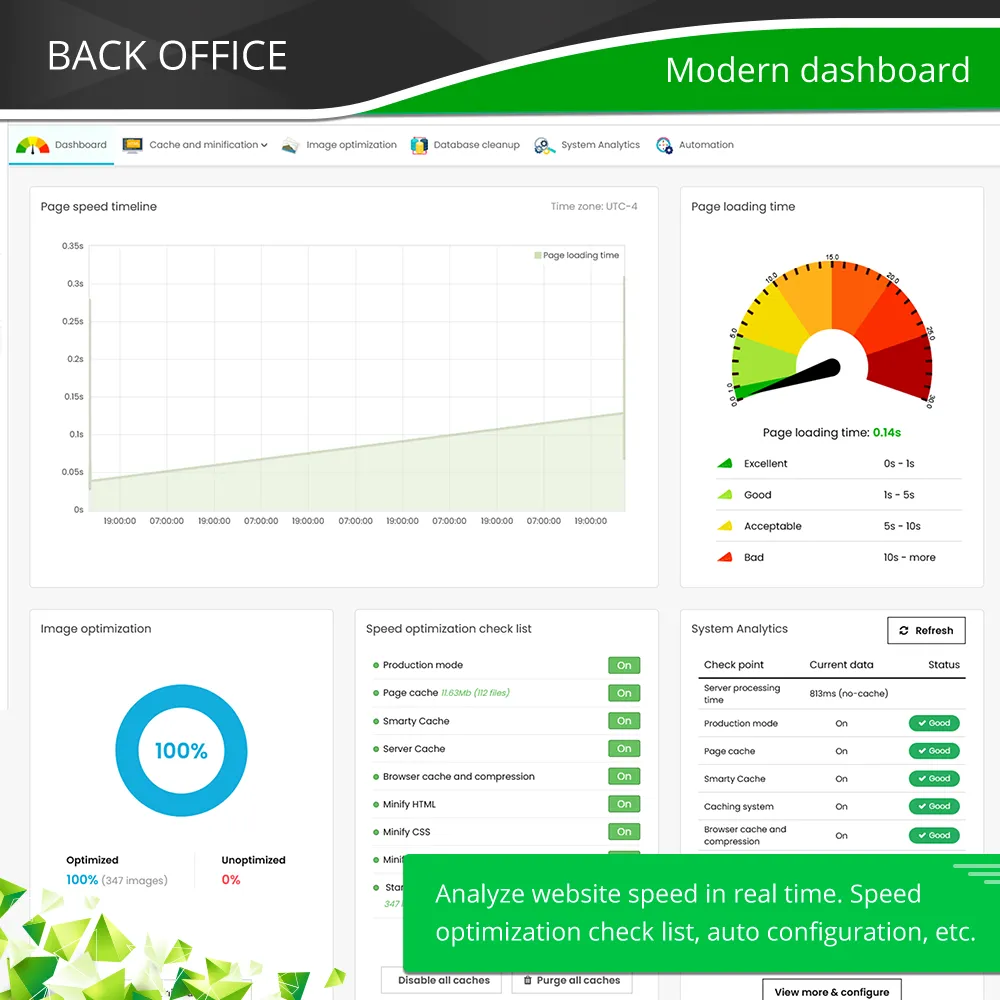
Not a developer? One-click Auto Configuration applies recommended settings and starts image optimization for you. The dashboard shows your page speed and a checklist of what to enable next, and a single cronjob keeps cache and database clean automatically.
Together, these pillars deliver faster pages, better PageSpeed and GTmetrix scores, and stronger PrestaShop SEO optimization.
Who Should Use Super Speed?
Super Speed is a PrestaShop speed optimization module for every store that wants better performance, user experience and PrestaShop SEO optimization, especially if your store:
Is growing and slows down during busy periods.
Runs on hosting with Redis, or uses Cloudflare.
Sells in several currencies or uses customer-group pricing.
Runs Google or Facebook ads and wants ad visitors to land on fast, cached pages.
Uses a separate PrestaShop cache module, image optimizer and database cleaner, and wants one solution.
Frequently Asked Questions
Q: Why can Super Speed make my PrestaShop store load faster?
A:Super Speed is a PrestaShop speed optimization module that combines page cache, image optimization, server and browser cache, code minification with Brotli/GZIP compression, Redis cache, Cloudflare edge cache and database optimization.
Together, they reduce server and database workload, speed up page loading and improve the browsing experience.
Q: What is PrestaShop page cache and how does it make my website faster?
A: Page cache, also called full page cache, is a ready-to-use copy of a web page. When a visitor opens a page for the first time, Super Speed saves a static HTML version of it.
When other visitors open the same page later, Super Speed shows the saved version immediately instead of rebuilding it from scratch. This helps pages load faster and reduces server workload.
Q: Is Super Speed a full page cache module for PrestaShop?
A: Yes. Super Speed is a PrestaShop cache module with a full page cache that stores complete HTML pages and serves them without rebuilding them on every visit.
Each page is cached by customer context (language and currency, plus optional customer group, login status, cart status, country, state and device), and it also adds image optimization, server and browser cache, minification, Redis, Cloudflare and database cleanup in the same module.
Q: Will customers see the wrong cart, login status or prices on cached pages?
A: No. Super Speed caches pages by language and currency, and can also split the cache by customer group, login status, cart status, country, state and device when you enable these options.
On top of that, it caches the cart, customer sign-in and currency blocks separately for each visitor context and loads them right after the page appears.
Product prices can also load dynamically, so multi-currency stores and customer-group prices always show correctly.
Q: Can I use Super Speed if my website contains dynamic content?
A: Yes. Super Speed automatically handles common dynamic content such as shopping carts, checkout and customer accounts. In most cases, no additional configuration is required.
If your store includes custom modules or dynamic sections, you can mark those modules or hooks as dynamic so they load live after the page appears and are never stored in the cache, or exclude specific URLs from page cache.
Q: Does Super Speed support caching for Creative Elements pages?
A: Yes. Super Speed detects Creative Elements automatically and caches pages built with it like any other page.
The Creative Elements header is loaded separately for each visitor, and cart widgets stay hidden until the visitor's real cart is loaded, so shoppers never see someone else's cart.
If you use another page builder or custom dynamic sections, our support team can help configure them.
Q: Can Super Speed cache search result pages?
A: Yes. Search result pages are cached by default with a short lifetime (1 day, adjustable), so popular searches load almost instantly and your database does less work.
Each keyword, page and sort order is cached separately, and cache pollution protection stops bots from filling your cache with random searches.
Q: Will my changes appear right after I edit a product?
A: Yes. Super Speed's smart cache refresh clears the pages related to your change automatically, and, when connected, purges the matching URLs from Cloudflare too.
Q: Can Super Speed optimize and compress PrestaShop images, including both existing and newly uploaded images?
A: Yes. Super Speed's PrestaShop image optimization tool can compress images already uploaded to your store as well as images uploaded in the future. This reduces image file size, improves loading speed and keeps your store fast over time.
Q: Will image optimization reduce image quality?
A: In most cases, no. Super Speed compresses images to reduce file size while keeping their visual quality. Visitors typically won't notice any difference, but the smaller images help pages load faster.
Q: Can Super Speed convert my images to WebP?
A: Yes. Super Speed converts all your images to WebP format to reduce file size and improve loading speed.
Product images use .webp URLs, while other images such as category, banner, logo and slider images are served as WebP but keep their original .jpg or .png file names.
For browsers without WebP support, it can still serve the original JPG.
Q: Does Super Speed support Redis? Do I still need Redis Cache Pro?
A: Yes, Super Speed includes a built-in Redis cache that stores database query results in memory. It requires a Redis server and the PHP redis extension on your hosting.
You don't need Redis Cache Pro: when you upgrade, Super Speed migrates its Redis settings automatically.
Q: Does Super Speed work with Cloudflare?
A: Yes. Connect Super Speed with your Cloudflare Zone ID and API token to purge the cache automatically when you update pages.
You can also enable full HTML page cache on Cloudflare, so complete pages are delivered from Cloudflare's edge servers close to your visitors instead of from your hosting server. Super Speed shows the exact Cloudflare Cache Rules settings to use.
Q: How can I reduce TTFB (Time To First Byte) on my PrestaShop store?
A: With Super Speed, enable page cache so pages are served without rebuilding them, Redis cache so repeated database queries come from memory, and optionally full HTML page cache on Cloudflare so pages are delivered from the edge.
System Analytics also helps you find slow modules that increase TTFB. Results depend on your hosting and installed modules.
Q: Can Super Speed improve LCP (Largest Contentful Paint)?
A: In most cases, yes. Smaller WebP or compressed images, Lazy Load, minified CSS/JavaScript and a faster server response from page cache all help the largest element on your page appear sooner.
Results still depend on your theme, hosting and third-party scripts, so we can't guarantee a specific LCP value.
Q: Can Super Speed clean up unnecessary data from my database?
A: Yes. Super Speed's database optimization tool removes unnecessary data such as connection logs, abandoned carts, expired discount codes, mail history and other temporary records.
You choose how many days of data to keep, can export records first, and can schedule cleanup automatically with a cronjob.
Q: Will Super Speed improve my Google PageSpeed Insights, GTmetrix scores and Core Web Vitals?
A: Yes, in most cases it will.
However, the improvement may not always be as high as expected because these tools evaluate many factors beyond the scope of any optimization module, including server response time, theme structure, third-party scripts and external resources. Super Speed focuses on improving real website performance, which is often more important than benchmark scores.
Q: Should I use one all-in-one speed module or separate cache, image and database modules?
A: For most stores, one all-in-one module is simpler and safer. Super Speed manages page cache, image optimization, server and browser cache, minification, Redis, Cloudflare and database cleanup from one menu, so features don't overlap or conflict with each other, and you only have one module to configure and update.
Q: I want to improve my website speed with Super Speed, but I don't know which settings to use. Can you help?
A: Yes. Simply run One-click Auto Configuration to apply the recommended settings for your store. It only takes one click to get started.
If you need additional optimization or your store has custom requirements, our support team is always ready to help.
Q: Which PrestaShop versions does Super Speed support?
A:Super Speed 3.x supports PrestaShop 1.7 to 9.x.
View more
Features
Features
Page cache (full page cache)
Enable/disable PrestaShop page cache.
Cache all or selected page types with configurable cache lifetime: home, category, product, CMS, search, new products, best sellers, prices drop, suppliers, manufacturers, contact, sign-in, stores, sitemap.
Customer context cache: separate cached versions by language and currency, plus optional splits by customer group, login status (guest/logged in), cart status (empty/filled), country, state and device (desktop/tablet/mobile).
Snippet cache for cart, customer sign-in and currency blocks.
Dynamic product prices cache for multi-currency and customer-group pricing.
Cache pollution protection (limit cache variants per IP).
Compress page cache into ZIP files to save disk space.
Preserve combined CSS/JavaScript filenames after cache reset.
Smart cache refresh when products, categories, CMS, hooks or performance settings change.
URLs not cached: any URL containing a fragment you choose bypasses page cache.
Dynamic modules and hooks: choose which module or hook content loads live and is never stored in the cache.
Custom Live JavaScript execution after dynamic content loads.
Support page caching for PrestaHero BLOG, Helpdesk, Help Center, Product Feed and Collections pages.
View cached pages, snippets and prices with cache statistics.
Cache skip logs and cache purge logs.
Image optimization
Optimize existing PrestaShop images with one click.
Automatically optimize newly uploaded images.
Multiple optimization methods: standard compression, WebP conversion, Tinify (TinyPNG/TinyJPG) and reSmush.it.
WebP for all images: product images use .webp URLs; other images (category, banner, logo, slider…) are served as WebP while keeping their .jpg or .png file names.
Choose WebP converter: Vips, Imagick, Gmagick or GD.
Serve JPG to browsers without WebP support.
Configure image quality level.
Optimize product, category, manufacturer, supplier, banner, logo, slider and other image types.
Optimize images of the default Home Slider and Banner modules and the PrestaHero BLOG module.
Upload and optimize images directly from your computer.
Browse server folders and optimize any image manually.
Restore optimized images when supported by the selected optimization method.
Image optimization logs.
Built-in lazy loading with 6 loading animations.
Configure Lazy Load for product lists, home slider and home banners.
Remove unused images to save hosting storage.
Server cache
Template compilation cache (Smarty).
Template output cache (Smarty).
Browser cache and compression
Enable/disable browser cache and Brotli/GZIP compression.
Step 2: Reload your back office, then navigate to "PrestaHero > PrestaHero modules" and click on "Connect to PrestaHero" to connect your website with PrestaHero securely with your PrestaHero credentials.
Step 3: Find the module you purchased (or free) modules and click "Install" or "Upgrade" to install the modules or upgrade your modules any time a new version is released.
*Note:
Premium download: besides installing the modules using PrestaHero Connect, you can open "My account > My downloads" page at PrestaHero and download your purchased modules.
Free download: you can download the installation package directly on the module details page at PrestaHero.
Change log
Version 3.1.0
Purge Cloudflare / CDN cache by URL prefix — clear only the sections you need (for example, a language or category path), not the whole site
Stronger Back Office permission checks on module actions, so each employee only does what their role allows
Safer handling of Cloudflare credentials and purge rules, plus tighter control over file and cache paths in the admin tools
Wishlist hearts stay accurate for logged-in customers on cached pages
Theme widgets for cart, customer and currency work more reliably with page cache
Smoother install and upgrade on older PrestaShop 1.7 stores
Image and analytics tools in the Back Office stay ready to use right after you update
Version 3.0.9
Smarter cache refresh — Page cache, snippet cache, and Cloudflare purge now refresh only when hooks truly change, so your store stays fast while you work in the back office.
Stronger cache infrastructure — Clearer handling with Memcached and Redis setups, and smoother page-cache storage on modern MySQL 8 environments.
Ready for PrestaShop 8.2 / 9 — Product image paths follow the latest PrestaShop standards, so image tools and WebP conversion stay aligned with current shops.
More reliable WebP output — Conversion and validation are tightened so optimized images are consistent and ready for the storefront.
Broader PrestaShop 1.7 support — Install, upgrade, and hook aliases work more smoothly across older 1.7.x versions.
Version 3.0.8
Stronger page caching for a quicker browsing experience across your catalog and key storefront pages
Smarter cache handling for logged-in customers, so personalized areas stay accurate while the rest of the shop stays fast
New Redis integration to boost performance on high-traffic stores
Built-in Cloudflare / CDN tools to clear and refresh content more easily when you update the shop
Smoother lazy loading so images load efficiently without slowing the first view of important visuals
Cleaner dynamic pricing display that stays consistent with your theme
Safer product image handling aligned with current PrestaShop versions
Clearer Back Office cache labels and menus, so performance settings are easier to manage
More reliable cache refresh after product updates and store changes
Improved compatibility with PrestaShop 9 and modern hosting environments
Version 3.0.3
Module improvements
Version 3.0.1
Ready for modern PrestaShop — Built for PrestaShop 1.7 and newer (including PS 8/9). PrestaShop 1.6 is no longer supported.
Faster, smarter page cache — Cache can be separated by device, customer group, login/cart status, country, and more — so visitors get the right cached page more often.
Dynamic content without slowing the whole page — Cart, account, and similar blocks can load via snippet cache; product prices can refresh dynamically while the main HTML stays cached.
Smarter URL & search caching — Better handling of query parameters; search and more page types (stores, guest account, checkout with OPC, Helpdesk/Help Center…) can be cached when applicable.
Cloudflare CDN integration — Connect Cloudflare to purge cache, control HTML/browser cache TTL, and keep edge cache in sync when you clear Super Speed cache.
CSS/JS stay fresh with CDN cache — When Cloudflare HTML cache is on, assets get a version stamp so shoppers don’t see outdated styles/scripts after you update the store.
Safer automation — Cron runs from the command line with a secure token; old public super-token is removed. Front-office cache clearing is disabled by default.
New Automation area in Back Office — Schedule clearing of expired cache and database cleanup from one place (replaces the old Helps tab).
Cleaner Back Office — Clearer tabs (Minification, Database cleanup, Automation), refreshed dashboards/statistics, and more consistent settings names.
More reliable upgrades — Module structure rewritten for stability; overrides refreshed; many old setting typos are migrated automatically.
Version 2.1.10
Module improvement
Version 2.1.9
Improved compatibility with PrestaShop 9.x and PHP 8.3.
Optimized database query tracking mechanism for better stability.
Improved cache folder handling during cache clearing.
Version 2.1.8
Module improvement
Version 2.1.7
Improved compatibility with PrestaShop 9.x and PHP 8.4 environments to ensure Webservice updates are processed correctly.
Version 2.1.6
Updated the SQL query used to fetch cache data for the dashboard, ensuring accurate reporting of cache information.
Version 2.1.5
Improved cache invalidation performance when saving categories containing a large number of products.
Optimized the cache clearing process during category updates to reduce execution time and prevent timeout issues on large catalogs.
Version 2.1.4
Module improvement
Version 2.1.3
Improved compatibility with PrestaShop email hooks.
Ensured third-party and custom modules can reliably control email sending behavior.
Enhanced hook handling to fully respect PrestaShop core logic.
Better stability and compatibility on PrestaShop 8.x.
Version 2.1.2
Module improvement
Version 2.1.1
Added support for Cloudflare cache clearing when the website is using Cloudflare together with Super Speed.
Automatically clears Cloudflare cache when “Clear All Caches” is triggered, ensuring changes are applied instantly.
Version 2.1.0
New feature: Added “Use all customer groups for caching” option for improved accuracy when customers belong to multiple groups.
Version 2.0.9
Module improvements
Version 2.0.6
Update compatible with PrestaShop 9.x
Module improvements
Version 2.0.5
Update compatible with PrestaShop 9.0
Version 2.0.4
Module improvements
Version 2.0.3
Minor changes
Version 2.0.2
Handles the case where if the browser does not support webp images, it will display JPG images.
Version 2.0.1
Module improvement
Version 1.9.8
Update override code
Version 1.9.7
Module improvement
Version 1.9.3
Module improvement: Update compatible with PrestaShop Enterprise
Version 1.9.1
Update compatible with Creative Element module
Version 1.9.0
Minor CSS changes
Version 1.8.9
Update cronjob feature
Version 1.8.8
Module improvement: Reduce the number of cache deletions when editing product information
Version 1.8.4
Module improvements
Version 1.8.2
Update compatibility with ps_blockwishlist module
Version 1.8.1
Module improvements
Version 1.7.9
New feature: cache clearing history statistics
Version 1.7.6
Module improvements
Version 1.7.4
New feature: listing all URLs that failed to create a cache
Boost page speed, optimize server resources & improve SEO ranking with page cache and other caching technologies, HTML/CSS/JavaScript minification, GZIP compression & system analytics. Page Cache Pro guarantees to make your website faster than ever!
Get rid of spam emails and fake customer accounts with Google CAPTCHA - reCAPTCHA, Cloudflare Turnstile, IP blacklist, and email blacklist. The best PrestaShop captcha module for contact form, login and registration form, newsletter subscription, and all other forms.
The most powerful Advanced top PrestaShop mega menu module 2026, awesome design, super easy-to-use, display perfectly on mobile devices, visual drag/drop backend, support both vertical & horizontal responsive menu. The best navigation module ever!
Transform PrestaShop into a multi vendor marketplace with easy setup steps. This module enables sellers to list their products on your site and pay you a percentage fee per sale or a monthly membership fee
Hit Google top result with best SEO practices in 2026! SEO Analytics, Pretty URL, Sitemap, Auto Image ALT, meta title, meta description, Google Snippet, RSS & social network optimization. Also integrated with ChatGPT for generating SEO content.
The most trusted professional PrestaShop blog module. Can be integrated with ChatGPT for generating content! Up-to-date with SEO practices, a WordPress alternative, All-in-one blog module for your store!
The best visual drag & drop contact form with CAPTCHA. Create any kind of form: contact form, order form, etc. This is a feature-rich and secure PrestaShop contact form module.